EvoFox Blaze 2 Plus Review: Is It Worth ₹999?
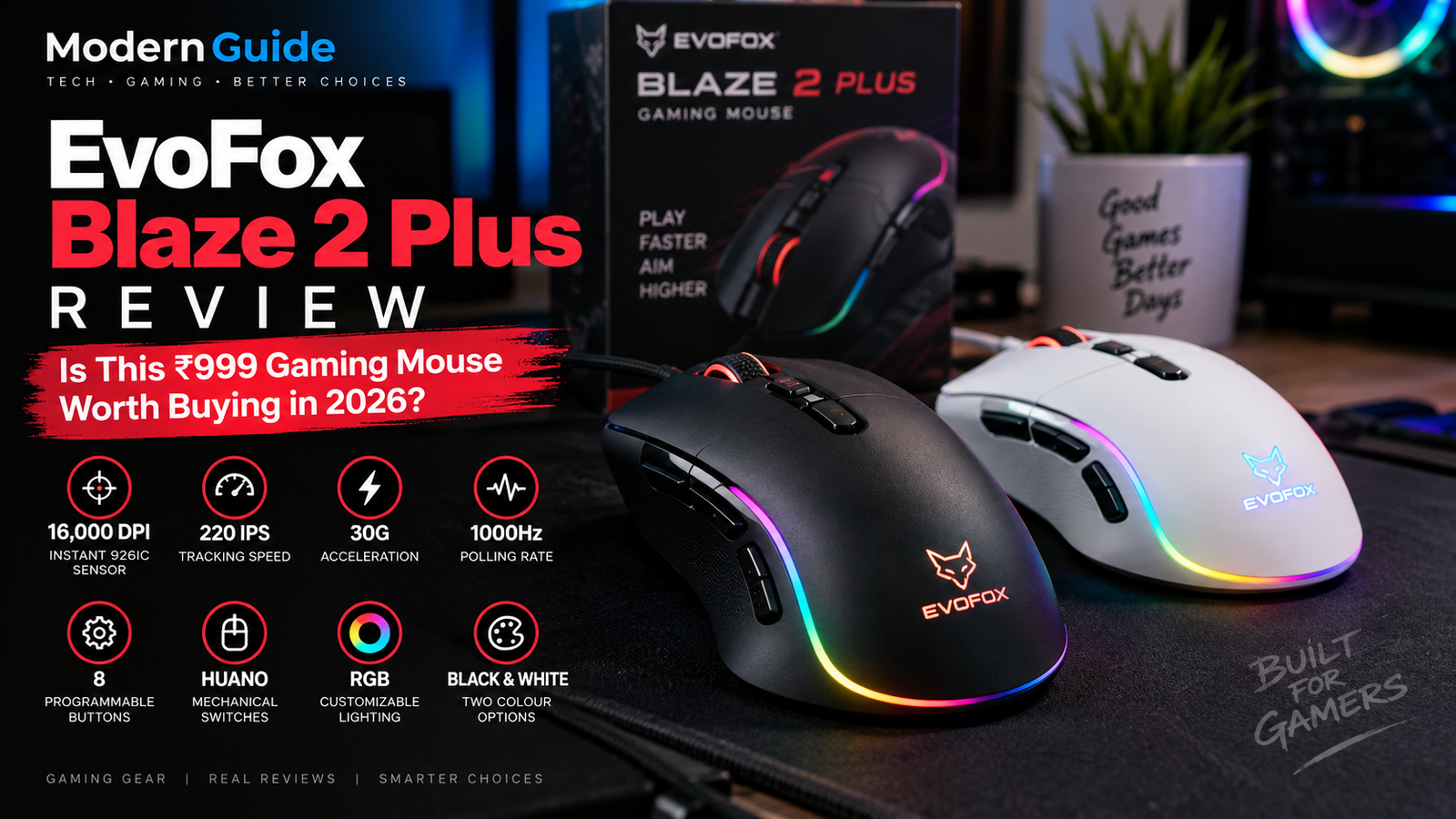
EvoFox Blaze 2 Plus Review: Is This ₹999 Gaming Mouse Worth Buying in 2026?
Finding a good gaming mouse on a tight budget isn’t always easy. Some models look impressive on paper but lack useful features, while others offer plenty of buttons and lighting without explaining how they actually improve your gaming experience.
That’s why the newly introduced EvoFox Blaze 2 Plus caught my attention.
Amkette has launched this wired gaming mouse in India at a reported price of ₹999. It brings a higher-resolution sensor, programmable buttons, RGB lighting, and a 1000Hz polling rate to the budget gaming segment.
But do these specifications make it a sensible choice for gamers, or are they simply numbers that look good on a product page?
In this EvoFox Blaze 2 Plus review, we’ll break down its specifications, features, potential advantages, limitations, and what you should consider before buying it.
Editorial note: This is a specification-based first-look review, not a hands-on test. We have not independently measured its sensor performance, click latency, comfort, or long-term durability.
EvoFox Blaze 2 Plus: Quick specifications
Here is a quick look at the specifications reported at launch.
| Feature | Specification |
| Product name | EvoFox Blaze 2 Plus Wired |
| Brand | EvoFox / Amkette |
| Launch price | ₹999 |
| Connection | Wired USB |
| Sensor | Instant 926IC Gaming Sensor |
| Maximum DPI | 16,000 |
| Maximum tracking speed | 220 IPS |
| Acceleration | 30G |
| Polling rate | Up to 1000Hz |
| Programmable buttons | 8 |
| Switches | Huano mechanical switches |
| Lighting | Customizable RGB |
| Colours | Black and White |
1. Design and build: What should you expect?

The EvoFox Blaze 2 Plus is a wired gaming mouse designed for PC gamers who want gaming-oriented features without spending a large amount.
Its RGB lighting and multiple programmable buttons give it the familiar look and functionality of a gaming-focused peripheral. The mouse is available in black and white colour options, according to launch information.
However, design is more than appearance.
Before buying, I would want to know:
- Does the mouse fit comfortably in different hand sizes?
- Is the shape suitable for palm, claw, or fingertip grip?
- Does the plastic feel sturdy?
- Is the cable flexible enough for regular gaming?
- Are the side buttons easy to reach without accidental clicks?
These details matter because a mouse can have impressive specifications and still feel uncomfortable after an hour of gaming.
My take: The feature list makes it worth investigating, but I wouldn’t judge its build quality or ergonomics without handling it in person.
2. Sensor performance: 16,000 DPI and 220 IPS

One of the main features of the EvoFox Blaze 2 Plus is its Instant 926IC Gaming Sensor.
The reported specifications include:
- Up to 16,000 DPI
- Up to 220 IPS tracking speed
- 30G acceleration
Let’s understand what these numbers actually mean.
What is DPI?
DPI, or dots per inch, describes how far the cursor moves relative to physical mouse movement.
A higher DPI makes the cursor move farther with less physical movement. That can be useful for certain setups, but higher DPI does not automatically mean better gaming performance.
For example, many FPS players prefer a lower sensitivity because it allows larger arm movements for aiming.
What does 220 IPS mean?
IPS stands for inches per second. It describes the maximum speed at which the sensor is rated to track movement.
A higher tracking-speed specification can be useful for fast mouse movements, but the number alone doesn’t tell us whether the sensor will maintain accurate tracking in every situation.
What about 30G acceleration?
This specification refers to the acceleration the sensor is rated to track.
It is not a measure of how quickly your character moves in a game or how much damage you deal.
What this means for gamers: The reported sensor specifications are relevant to fast-paced gaming, but real-world tracking accuracy, consistency, and performance still need independent testing.
3. Is a 1000Hz polling rate good for gaming?
The EvoFox Blaze 2 Plus supports a reported polling rate of up to 1000Hz.
Polling rate describes how frequently the mouse reports its position to the computer.
At 1000Hz, the theoretical reporting interval is approximately 1 millisecond.
That can provide frequent input updates, which is useful for responsive mouse control. However, it doesn’t mean the entire system has exactly 1ms of input latency.
Your PC, game engine, display, and other parts of the setup also affect responsiveness.
For everyday gaming, a 1000Hz polling rate is a useful specification to have. It is not, by itself, proof that this mouse will outperform other models.
4. Eight programmable buttons: A useful feature?

The Blaze 2 Plus comes with eight programmable buttons.
This could be useful for gamers who prefer having extra commands directly on their mouse.
Depending on the supported software and button configuration, programmable buttons can be used for things such as:
- Switching weapons
- Opening inventory
- Activating abilities
- Assigning shortcuts
- Performing frequently used commands
For games such as Minecraft, extra buttons can be convenient for inventory-related shortcuts or other actions.
For productivity, additional buttons may also be useful for shortcuts in supported applications.
One important detail: the exact customization options and software compatibility should be checked before purchase. Not every programmable mouse supports every type of macro or command.
5. Huano mechanical switches and RGB lighting
The Blaze 2 Plus uses Huano mechanical switches and includes customizable RGB lighting, according to its launch specifications.
Mechanical switches
Mouse switches affect the feel and sound of clicks.
However, the use of a particular switch brand doesn’t automatically establish how long the buttons will last or whether the clicks will feel satisfying.
For that, independent durability testing and hands-on feedback would be useful.
Customizable RGB lighting
RGB lighting is mostly a personal preference.
Some gamers enjoy matching their mouse lighting with the rest of their setup, while others prefer a simpler look.
Before buying, check what lighting effects are available and whether they can be changed or disabled through the supported controls.
6. EvoFox Blaze 2 Plus vs EvoFox Blaze 2: What’s different?
This is an important comparison because the product names are similar.
The Blaze 2 Plus Wired is a newer model announced in September 2026. The earlier Blaze 2 Wired and Blaze 2 Wireless are separate products.
Here’s a specification-based comparison:
| Feature | Blaze 2 Wired | Blaze 2 Plus Wired |
| Sensor | Instant S205 | Instant 926IC |
| Maximum DPI | 12,800 | 16,000 |
| Tracking speed | Up to 120 IPS | Up to 220 IPS |
| Acceleration | Not confirmed here | 30G |
| Polling rate | Up to 1000Hz | Up to 1000Hz |
| Buttons | 8 | 8 |
| RGB lighting | Yes | Yes |
| Switches | Huano | Huano |
The earlier wired model’s specifications are listed in product information and launch coverage; the Plus specifications are from its recent launch report.
Does the Plus model automatically make the older one obsolete?
Not necessarily.
The Plus has higher reported sensor specifications, but that doesn’t automatically mean it offers a noticeably better experience for every gamer.
The older Blaze 2 Wired may still be worth considering if its price is substantially lower and its feature set meets your needs.
Compare the exact model, seller, warranty, and current price before making a decision.
7. Gaming performance: Can it handle FPS games?

On paper, the Blaze 2 Plus has specifications that are relevant to FPS and other fast-paced PC games.
The reported 16,000 DPI maximum, 220 IPS tracking speed, and 1000Hz polling rate give buyers several technical details to consider.
But I wouldn’t call it a proven competitive gaming mouse without testing it.
For games such as Valorant, Counter-Strike 2, or Apex Legends, important things to evaluate include:
- Tracking consistency during fast flicks
- Sensor behaviour at different sensitivity settings
- Click response and reliability
- Shape and grip comfort
- Weight and balance
- Cable drag during movement
These are the factors that would help determine whether it suits competitive play.
What about Minecraft and casual gaming?
For Minecraft, Roblox, GTA V, and other casual games, many players may find that programmable buttons and a responsive wired connection are more relevant than reaching the maximum DPI setting.
Still, comfort, reliability, and software support matter just as much.
Bottom line: The specifications make the Blaze 2 Plus a candidate for gaming, but real-world performance remains to be established.
8. Pros and cons of the EvoFox Blaze 2 Plus
Potential advantages
- Reported launch price of ₹999
- Up to 16,000 DPI
- 220 IPS tracking-speed rating
- 1000Hz polling rate
- Eight programmable buttons
- RGB lighting
- Black and white colour options
Things to check before buying
- Actual weight and dimensions
- Comfort for your grip style
- Independent sensor testing
- Cable quality and flexibility
- Software and operating-system compatibility
- Warranty and after-sales support
- Current price and seller reliability
The advantages listed above are based on reported specifications, not hands-on testing. The points to check are questions that a buyer should investigate before purchasing.
9. Is the EvoFox Blaze 2 Plus worth ₹999?

The Blaze 2 Plus launched at a reported price of ₹999 in India.
At that price, the specifications make it an interesting option to compare with other budget gaming mice.
But whether it is worth buying depends on what you value most.
It may suit you if:
- You want a wired gaming mouse.
- You prefer having several programmable buttons.
- You want to explore a budget gaming peripheral with a high maximum DPI rating.
- You like RGB lighting.
- You’re willing to check reviews and return policies before purchasing.
You may want to compare alternatives if:
- You need a particularly lightweight mouse.
- You prefer a wireless connection.
- You have a specific grip or hand-size requirement.
- You prioritize independently verified competitive gaming performance.
- You can find a tested alternative at a similar price.
The most useful comparison is not simply which mouse has the highest DPI. It’s which one provides the combination of comfort, tracking, reliability, and features that you actually need.
10. Where can you buy the EvoFox Blaze 2 Plus in India?
The reported launch price is ₹999.
Official Website:
Flipkart:
Amazon:
Frequently Asked Questions
1. What is the price of the EvoFox Blaze 2 Plus in India?
The reported launch price is ₹999. Actual retail prices may differ depending on the seller and availability.
2. What is the maximum DPI of the Blaze 2 Plus?
It supports a reported maximum of 16,000 DPI.
3. Does the EvoFox Blaze 2 Plus have programmable buttons?
Yes. It is reported to include eight programmable buttons.
4. Is the EvoFox Blaze 2 Plus wireless?
No. The Plus model discussed in this article is the wired version. It should not be confused with the separate Blaze 2 Wireless model.
5. Is the EvoFox Blaze 2 Plus good for Valorant?
Its reported sensor and polling-rate specifications are relevant to FPS gaming, but independent testing is needed to establish tracking consistency, latency, and comfort in Valorant.
6. Is it better than the older EvoFox Blaze 2 Wired?
The Plus has higher reported maximum DPI and tracking-speed specifications. Whether that translates into a better gaming experience depends on real-world performance, ergonomics, and price.
7. Does it work with laptops?
It is a wired USB gaming mouse, but buyers should verify compatibility with their specific laptop and operating system, particularly if they need an adapter or additional software.
Final verdict: Should you buy it?
The EvoFox Blaze 2 Plus Wired looks like an interesting new entry in India’s budget gaming mouse segment.
Its reported specifications include a 16,000 DPI sensor, 220 IPS tracking speed, 1000Hz polling rate, eight programmable buttons, and RGB lighting at a ₹999 launch price.
That gives gamers several features to consider without moving into a much higher price category.
However, specifications aren’t a replacement for actual testing. Until reliable hands-on reviews establish its comfort, tracking consistency, build quality, and long-term reliability, I would treat it as a mouse worth comparing rather than a proven competitive gaming recommendation.
My recommendation: Check its current price, verify the exact model, and compare it with other mice in your budget. If the features match your needs and the return policy is reasonable, it may be worth considering.